Better use of your screen
Concentrate on the useful part of a portrait video instead of leaving most of a widescreen display unused.
VVP Vertical Video Player for Windows
Watch portrait videos more comfortably on your landscape PC screen. Move the viewing area to follow what matters and see it enlarged alongside the original.
Available from Microsoft Store Videos stay on your PC
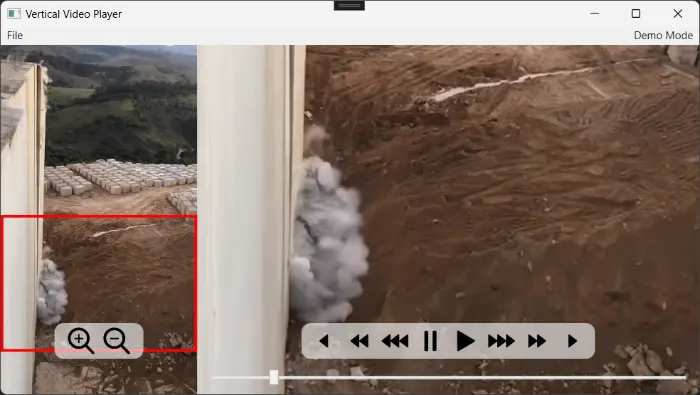
A clearer way to watch
Choose a portrait video from your PC.
Move the viewing area over what matters.
See that part enlarged beside the original.
Drag the viewing area around the portrait video to concentrate on whatever matters most.
Panning is included free.
VVP Pro lets you zoom into an area while retaining control of the viewing position.
Unlock Pro from inside VVP.
Made for Windows
Concentrate on the useful part of a portrait video instead of leaving most of a widescreen display unused.
Playback and processing happen on your PC. Video content and extracted frames are not uploaded.
VVP changes how the video is viewed. It does not crop or modify the source file.
VVP Basic is free, with no subscription, and available from Microsoft Store.
Free, straightforward vertical-video playback for your Windows PC.
Unlock VVP Pro when you want closer inspection and more precise playback.
£4.99 one-time in-app upgradeZoom up to 3× and pan while zoomed.
Use one-second seeking and frame stepping when supported.
Play at half or quarter speed and loop a selected range.
Install Basic first. Then select Upgrade inside VVP. Microsoft Store handles the purchase and licence.
Basic vs Pro
| Feature | Basic | Pro |
|---|---|---|
| Vertical video playback | Included | Included |
| Move viewing area | Included | Included |
| Standard timeline and five-second seeking | Included | Included |
| Zoom up to 3× and slow playback | — | Included |
| One-second seeking and frame stepping | — | Included |
| Selected-range looping | — | Included |
| Price | Free | In-app upgrade |
Where VVP helps
Watch portrait recordings more comfortably on a desktop monitor.
Move the viewing area to follow the part of the clip that matters.
Use Pro’s slower playback, zoom and frame controls to examine moments more closely.
Inspect areas of portrait footage without modifying the source video.
Latest release
VVP 1.0.3August 2026
Updated Microsoft Store access for the optional VVP Pro add-on.
Good to know
Yes. VVP Basic is free and available from Microsoft Store.
Install VVP Basic and select the Pro upgrade from inside the application.
No. VVP changes how the video is viewed rather than editing or cropping the source file.
No. VVP opens and processes your videos locally on your PC. It does not upload video content or extracted frames.
VVP accepts 3GP, AVI, MKV, MOV, MP4 and WMV files. Playback also depends on the video and audio codecs available in Windows.
VVP requires Windows 10, version 2004 (build 19041), or later.
Ready when you are
Get VVP Basic free from Microsoft Store.
Get VVP Basic — FreeUnlock Pro from inside VVP whenever you need the extra controls.